increasing conversion by 30% on book product pages
Product Designer
8 weeks
Product Owner, 3 Engineers, 2 QAs, Biblio Engineer
the problem
Users were bouncing at 70% because key information like book formats, retailer options, and related content was either hidden or hard to find. The page wasn't doing its job.
business need
Redesign product pages to work across Penguin's sub-brands while improving discovery and driving more retailer clicks.
constraints
Three things made this more complex than a typical redesign:
The solution had to work across multiple sub-brands with distinct visual identities
Book data is fed through a third-party API, requiring deep understanding of product mapping
A long list of stakeholder requirements, many with competing priorities
approach
Redesigned the product page template to surface key information upfront, handle edge cases gracefully, and make related content visible enough that users would actually follow it.
outcome
30% increase in RCCR
18% reduction in bounce rate
30% increase in visits to audiobooks and ebook

1.
discovery
users couldn't find what they needed — and stopped trying
HotJar data showed 50% of users never scrolled past the author section. Related books, digital formats, and series content were there — just invisible to most visitors. The most likely explanation: the author block looked like a footer, signalling the end of the page.
The bounce data reinforced this. With a 70% bounce rate and funnel analysis showing users repeatedly returning to the previous page — especially when arriving from a series page — it was clear the page wasn't giving people a reason to stay.


2.
planning
surface what matters, handle what's missing
The A/B tests pointed clearly in one direction: make retail options visible, and be selective about everything else. But the page had a structural problem too — it was brittle. When the API returned incomplete data, layouts broke and inconsistencies appeared across pages. Edge cases were everywhere.
The design goals were:
Reduce cognitive load by surfacing fewer, better-chosen things upfront
Create layouts that adapt gracefully to missing data
Make related content visible enough that users would actually follow it
Work across sub-brands without a separate template for each
3.
design
🚀 shipped design


🎨 design decisions
1
a neutral design system built for sub-brands
The new design system uses neutral colours and expresses brand identity through artwork and book covers rather than heavy UI treatment. Content teams can adjust background colours or add imagery to match their sub-brand, the component flexes without needing a bespoke template per brand.

2
adaptable boxes for edge cases
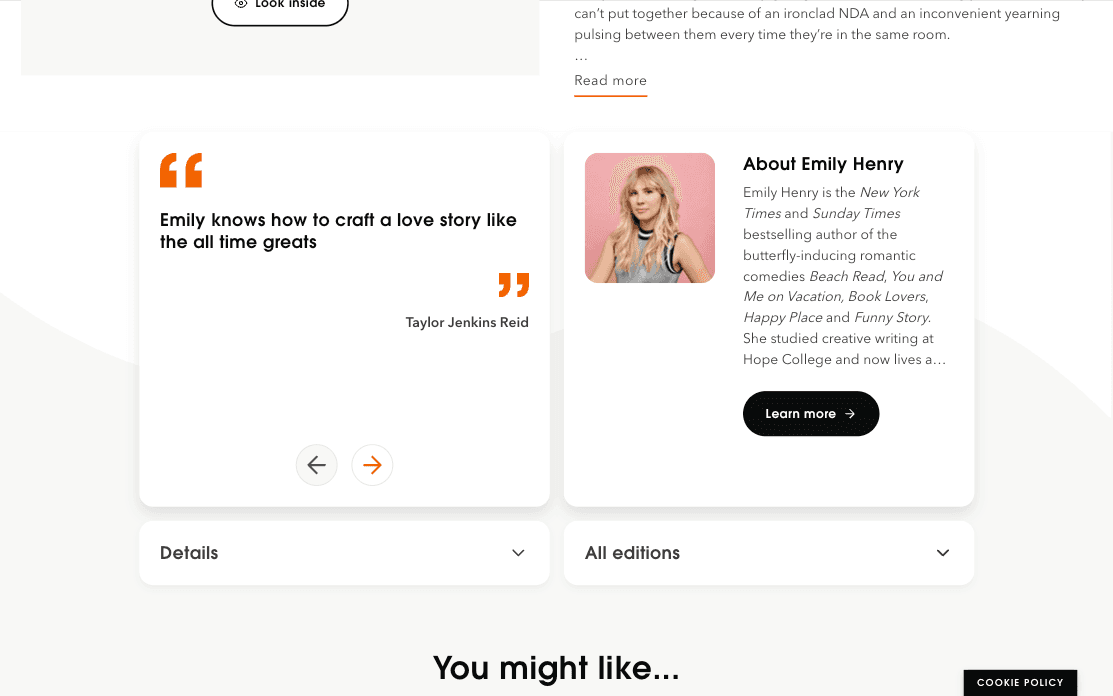
The old template had no fallback for missing data so layouts would break or show awkward gaps. The new design uses adaptable product data boxes that redistribute space when information is absent. If reviews aren't available, the author card expands to fill the gap. The page always looks intentional, regardless of what the API returns.
This also addressed the scroll depth problem. The boxed layout removes any visual cue that could be mistaken for a footer, making the page feel more open and worth exploring.
3
a tabbed book container for discovery
The old page showed related books inconsistently with series books sometimes, author books sometimes, nothing at all sometimes. I pushed to show all three simultaneously: series, author, and genre. A tabbed container (a familiar eCommerce pattern) gives users three clear paths and a link to more which works reliably regardless of what the API returns.

4
colloquial author names and contributor limits
Because book pages are generated automatically, contributor lists could get unwieldy. If there are more than seven contributors, the rest sit behind a 'see more' link, a self-explanatory, familiar pattern. I also changed the label format from 'Kevin Moloney (illustrator)' to 'illustrated by Kevin Moloney'. Friendlier, and more consistent with Penguin's tone.
