supporting offline reviewers without rebuilding the editor
Product Designer
1.5 months
Product Owner, 2 Engineers, QA, UXR
I designed a file-attachment flow for Elsevier’s New Peer Review Experience, helping reviewers submit richer feedback without forcing them to recreate work they had already completed offline.
The result was a simpler path for complex peer-review feedback, a three-point improvement in reviewer UMUX scores, and a solution that helped unlock rollout to thousands more journals.
the challenge
Reviewers were frustrated by a text-only feedback experience.
The New Peer Review Experience allowed reviewers to write simple replies, but peer review often involves much more than plain text. Reviewers needed to share annotated manuscripts, equations, tables, images, and feedback prepared outside the platform.
The question was not simply, “How do we make the editor more powerful?”
It was:
why this mattered
Reviewers are experts giving their time voluntarily. If the submission process forces them to repeat work, reformat content, or abandon familiar ways of reviewing, it adds friction to an already demanding task.
Supporting richer feedback would improve the experience for reviewers while helping the pilot scale to thousands more journals.
context
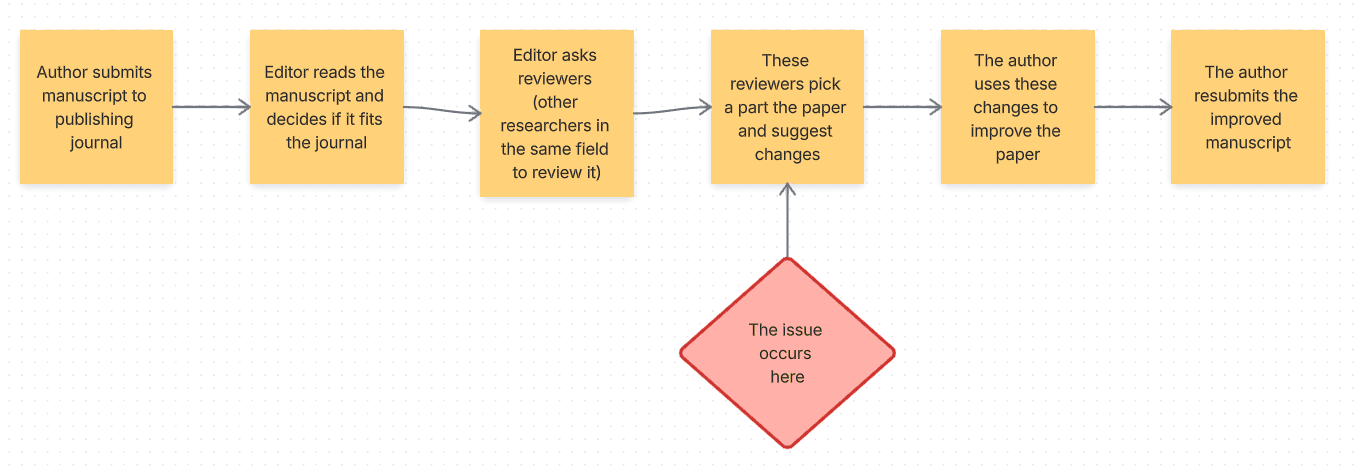
how reviews work….

where the problem occurred
The old text field handled simple messages just fine

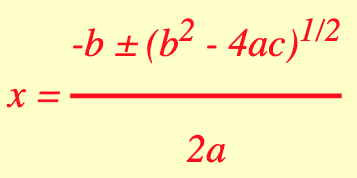

⬆️
But it couldn't handle more complex content
discovery
attachments were solving more than a formatting problem
The New Peer Review Experience was part of a larger digital transformation programme to replace Elsevier’s legacy Editorial Manager platform.
The legacy system gave us millions of examples of how reviewers had historically submitted their work. At first, many uploads appeared to contain only text. However, a deeper analysis showed a more varied picture.
71.95% of sampled uploads contained text only.
13.63% were annotated PDFs.
Reviewers also uploaded annotated Word documents, images, tables, and combinations of files.
This showed that attachments were not only a work

The data showed there were many use cases we were unaware of before undertaking discovery
Why reviewers uploaded files
Previous interview findings and UMUX feedback made the data more concrete. Reviewers used attachments because they needed to:
Submit equations and LaTeX-heavy content
Return annotated copies of a manuscript with targeted comments
Continue offline workflows without duplicating work
Preserve formatting such as bullets, italics, bold text, tables, and images
Use familiar ways of reviewing that they had developed over time
key insight
Reviewers are unpaid contributors. They are especially resistant to repeating work they have already done, so the experience should reduce unnecessary effort wherever possible.
approach
two main options: a rich text editor or file attachments
Early in the design process, it became clear that we had two main options:
Replace the simple text editor with a rich text editor
Enable file attachments in NPRE
Discussions with engineering, the product owner, the design system team and other stakeholders helped us understand the trade-offs.
rich text editor

Formatted text like bullets, bold and italics.
Part of existing design system
Doesn't support offline work
Additional engineering work for formulas etc.
file attachments

Formatted text like bullets, bold and italics.
Supports offline work and reduces duplication
It's a habitual behaviour already
Goes against product philosophy of structured and interactive converstaion.
Additional engineering work for malware, sanitisation
decision
We chose file attachments because they reduced duplication and frustration for reviewers. They were also easier for engineering to implement within the pilot.
design
The design needed to give reviewers more control over how they shared feedback while keeping the experience clear, familiar, and safe.
support real review behaviours
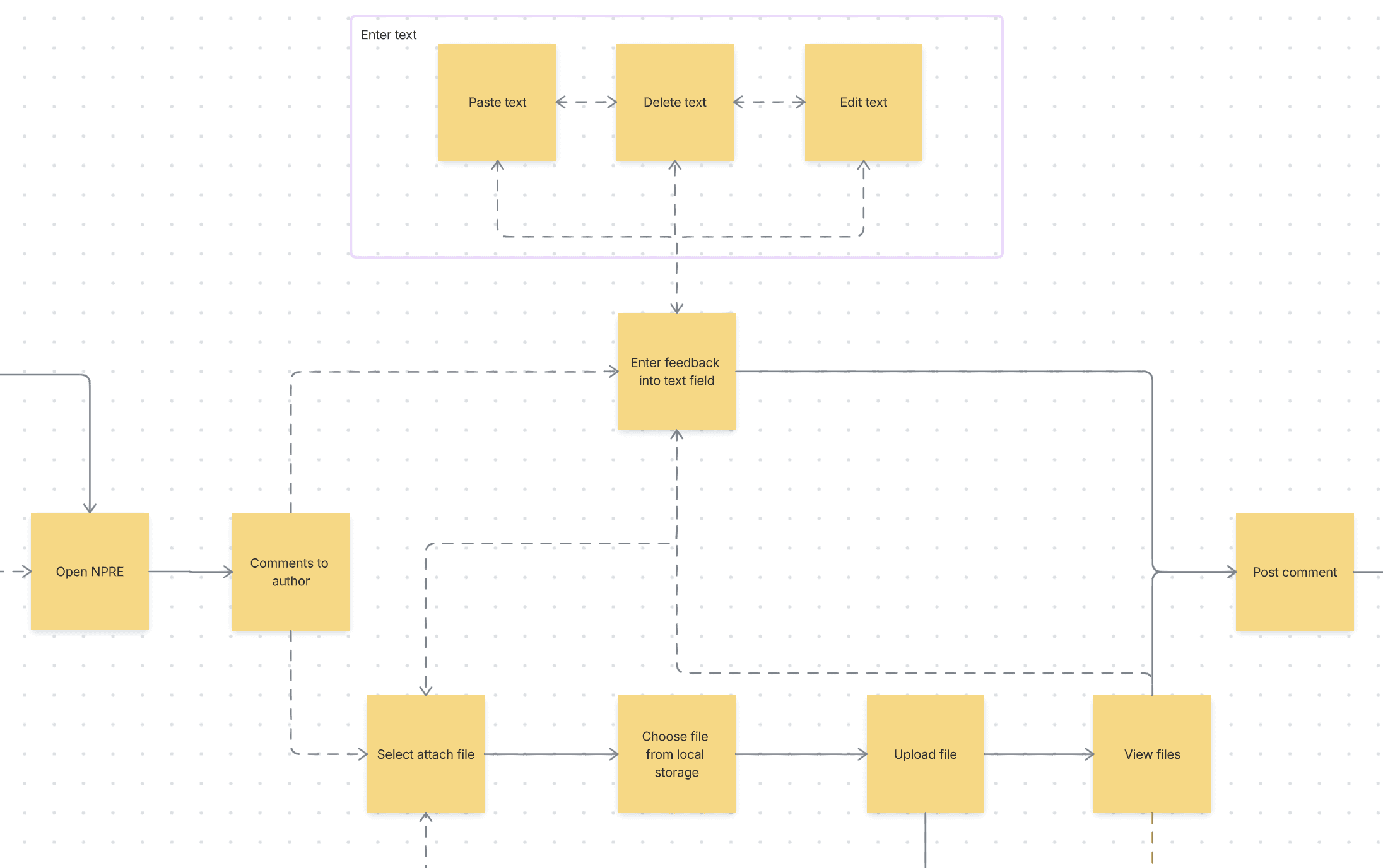
Write, paste, edit, and delete text comments
Attach files in commonly used formats, including documents, PDFs, images, and XML files
Add an attachment alongside a traditional comment
Review file details such as name, type, and size
Download or preview their own uploaded files
Edit or remove attachments before submitting their review
keep the interaction familiar
File upload is a widely understood pattern:
Select an attachment
Choose a file from local storage
See the upload state in the interface
Review or remove the selected file
Post the comment when ready
I kept the interaction close to established upload behaviour. Adding unfamiliar controls or new interaction patterns would have made a straightforward task feel more complicated.
protect reviewer anonymity
Peer review depends on trust. Authors should not be able to identify reviewers through file metadata, annotation usernames, contact details, or tracked changes.
At the same time, editors still needed access to the original information required for file history and operational support.
The solution was to store both versions of a file:
An unsanitised version for the editor’s internal history
A sanitised version that could safely be shared with the author
This protected reviewer anonymity without removing the operational information editors needed.
handling errors and failures
Malware scanning and metadata sanitisation happened when a reviewer uploaded a file, before the review was submitted.
If sanitisation failed, the editor was alerted while the reviewer could continue their submission. This kept an internal processing issue from creating unnecessary work for someone who was contributing their time voluntarily.
If malware scanning failed, the reviewer was informed immediately because the file could not enter the system. This was extremely rare, occurring in only 0.02% of cases, so a clear standard error message was appropriate.

prototype and pilot scope
keep it simple
The established upload pattern and Elsevier design system made the core interaction straightforward to prototype.
I focused the prototype on the critical reviewer journey:
Start a text comment
Attach a file
Receive upload feedback
Review the comment and attachment together
Post the comment
The prototype made the new interaction concrete enough for stakeholders to assess the experience, technical requirements, and effects on the wider peer-review workflow.


what we deliberately did not solve in the first release
The pilot had important constraints.
Reviewers still needed to add a text comment alongside a file.
Reviewers could attach only one file to each comment.
Allowing attachment-only feedback would have conflicted with the product’s structured, conversational model. Supporting multiple files would also have introduced additional complexity for editors and authors.
These were intentional scope decisions. The first release focused on the highest-value problem: allowing reviewers to submit richer work without forcing them to duplicate it in the platform.
4.
impact
Scaling unlocked - +1000s journals added to the pilot experience
UMUX scores improved by 3 points for reviewers
Reviewers can submit more complex feedback without recreating offline work.
5.
learnings
no reviewers work exactly the same way
The research showed that reviewer behaviour varies widely. Some people are comfortable completing everything online, while others prefer to print a manuscript, annotate it offline, and return to the platform only when their feedback is ready.
simple can be best
A rich-text editor may have appeared to be the more sophisticated solution. But it would not have solved the most important problem: reducing duplicated effort for reviewers who already had feedback in another format.
The best solution was not the most feature-rich one. It was the one that removed the most meaningful friction while respecting the constraints of the wider system.